When you search a clip on SauceMatch, the first thing that happens isn't the search. Your browser has to read through the video and pick out the frames worth searching. Only then does anything get looked up.
On phones, that reading step was the biggest part of the whole thing. 59% of a phone's clip search was just reading the video. So I rewrote how it's done.
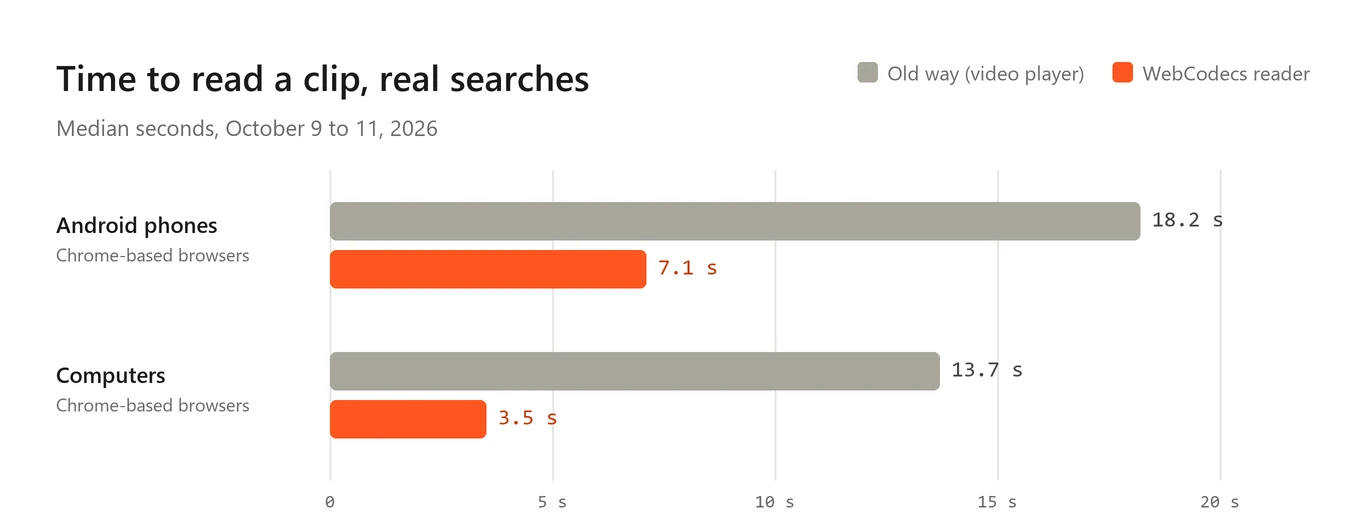
tldr: on Android phones, reading a clip now takes a median of about 7 seconds instead of 18. On computers it went from about 14 seconds to 3 and a half. The search finds exactly the same things it did before. And since October 11th, face search reads clips the same way.
Why reading a video is slow
The clip itself stays on your device. Your browser reads it right there and looks at up to 160 spots across it. At each spot it checks how sharp the frame is, whether it's a black screen or a blank moment, and how different it is from the frames it already has. Then it keeps the best 48 or so and searches those. The how it works page has more on that part.
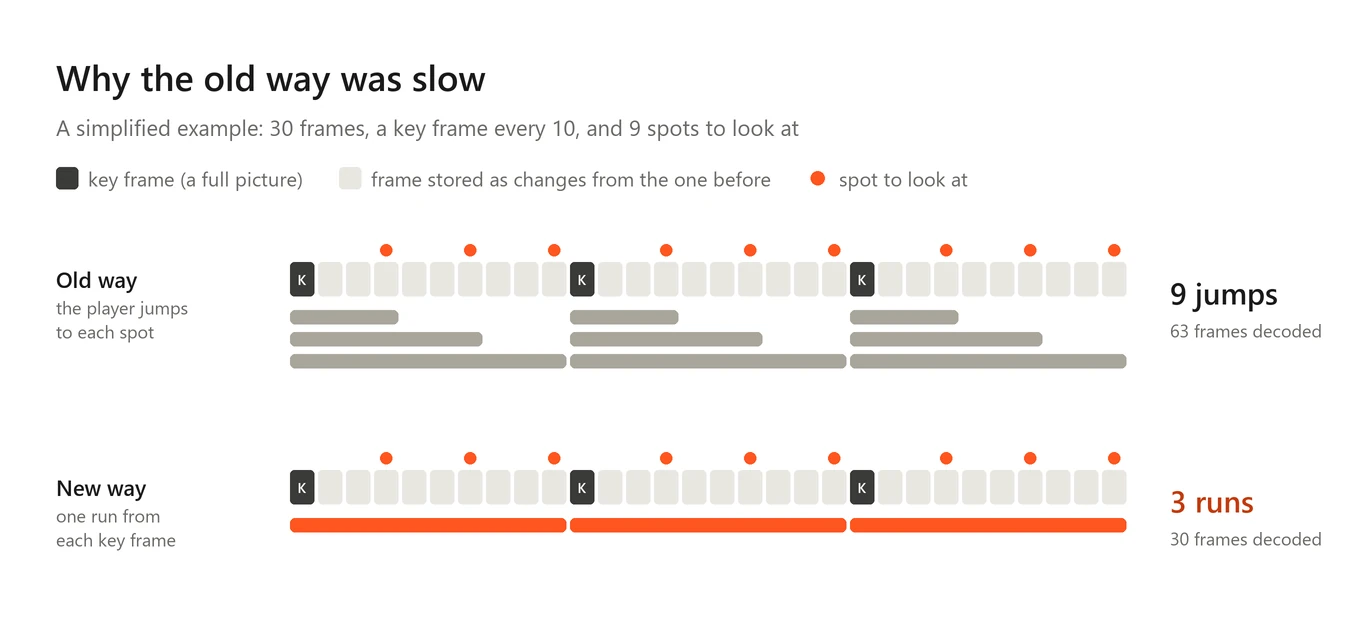
Until now, the way to look at a spot was the same video player you watch videos with. Jump to a time, wait for the picture, copy it, jump to the next one. Up to 160 times.
The problem is how videos are stored. A video file doesn't keep every frame as a full picture. Every so often there's a full picture, called a key frame, and the frames after it are only stored as changes from the one before. So to show you the frame at 0:37, the player has to go back to the last key frame before it and work forward through every frame in between.
And it does that again for every single jump. Two spots a second apart that share the same key frame? The same frames get decoded twice. Every jump is also a full round trip: the player throws away what it had, goes back, decodes forward, draws the frame and only then tells the page it's ready. On a phone one jump can take anywhere from a tenth of a second to a few seconds, and there are up to 160 of them.
Reading the file myself
Browsers have a lower level way to do this now, called WebCodecs. Instead of asking a player to jump around, you hand the browser the compressed frames yourself and it gives you back decoded pictures.
So now the page opens the file itself (with a small open source library called mp4box.js), finds where every frame sits, and feeds them to the decoder in order. All the spots that share a key frame get read in one run starting from that key frame, and every frame is decoded once. It all happens in the background, away from the part of the page you're scrolling, and the pictures that get searched are made there too.
It also only reads the parts of the file it needs. A 5 GB test file opens and is ready to go in about a third of a second.
Honestly, that was the easy part.
The hard part: the exact same frames
Here's the catch. If the new reader grabs a frame that's even one frame off from what the old player showed, the search can come out different. A Match could turn into a Similar, or disappear. I didn't want faster but slightly different. I wanted the same results, just sooner.
So the new reader has to answer one question exactly like Chrome's player does: if you ask for 0:37.25, which frame do you get? That turned out to be a deep question. Video files can say "skip the first half second" (that's called an edit list). Frames can be stored in a different order than they're shown. Phones record sideways and just save a note saying "turn this 90 degrees". And Chrome shows the last frame at or before the time you asked for, which isn't always the nearest one.
I wrote all of that out and tested it against what Chrome actually does. The test set had 40 files: clips, screenshots, GIFs, and a pile of phone style files I made on purpose to be annoying. Portrait video, letterboxed video, variable frame rate, 4K, files with their index at the end instead of the start, an iPhone style HEVC .mov with rotation and an edit list. For every file, both readers had to visit the same spots, measure the same numbers and produce the exact same JPEG, byte for byte.
They do. And on a simulated phone (Chrome slowed down 4 times, on a 2 Mbps connection), picking the frames went from about 3 seconds to under half a second, and the whole clip search took about half as long.
A check before every clip
Testing on my own files is one thing. Your phone is another. So the new reader doesn't trust itself.
Every time you search a clip, before it reads anything for real, it decodes one frame and compares it with what the normal player shows at the same moment. If they don't agree, or the file is something it doesn't know, or anything at all goes wrong, the page quietly goes back to the old way. Worst case your search is as slow as it used to be. It never fails because of the new reader.
It only runs in Chrome-based browsers like Chrome, Edge, Samsung Internet and Brave, because the frame rule it copies is Chrome's. Safari keeps the old player, and so does Chrome on an iPhone, which runs on Safari's engine underneath. That's fine, iPhones are already quick at jumping around a video. In real searches they read a clip in about 4 seconds the old way.
Real phones are weird
The check earned its place right away. In the first day, 7 of 14 clips on Android phones failed it.
The detail it logs said the same thing every time. The decoder took the frame, said it was done, and gave nothing back. No error. And the same file would pass on another try. So it wasn't the file, it was timing. Now when that happens, the check throws that decoder away and tries once more on a fresh one.
Then there was a second one. Android Chrome sometimes says "done, I'm at 0:37" before it has actually drawn that frame. So the check was comparing against the frame from before the jump, saw they didn't match, and turned down a clip that was perfectly fine. One of my own clips, 63 seconds long, took 35 seconds to read because of that instead of about 8. Now the check gives the player a moment and looks again before it decides. That fix went out on October 11th, and I'm still watching how it does on real phones.
Firefox on Android had its own problem, separate from all this. Copying a frame out of a video there gives back a blank picture (a known Firefox bug), so every clip came out empty and couldn't be searched at all. That's fixed now by copying the frames through WebGL instead, and I've confirmed it on my own phone. It's still slow there though, about 41 seconds to read a clip, because Firefox takes about a fifth of a second for every jump.
The numbers from real searches
The chart at the top is real clip searches on the site since the new reader went live on October 9th. These are medians, and the groups are still small, a few dozen searches each.
- Android phones, Chrome-based browsers: about 18 seconds to read a clip the old way, about 7 with the new reader. The whole search went from about 36 seconds to about 22.
- Computers, Chrome-based browsers: about 14 seconds the old way, about 3.5 with the new one. The whole search went from about 19 seconds to about 12.
To be fair about it, the old way group here is mostly the clips the new reader turned down, so it's not a perfectly clean comparison. But it lines up with the lab numbers, and the new reader typically looked at more spots per clip and still finished way sooner.
Face search too
Face search reads clips a bit differently. It looks at up to 64 spots for faces and makes a full size picture at each one. Since October 11th it uses the same reader, with the same check and the same way back to the old player when anything is off.
Before switching it on I ran the same kind of test. 44 test files, read both ways, and the face search got the exact same frames, byte for byte (one WebM file stays on the old player, since the new reader only does MP4 and MOV). I also killed the background reader in the middle of clips on purpose, to make sure it hands the rest over to the old way cleanly. It does.
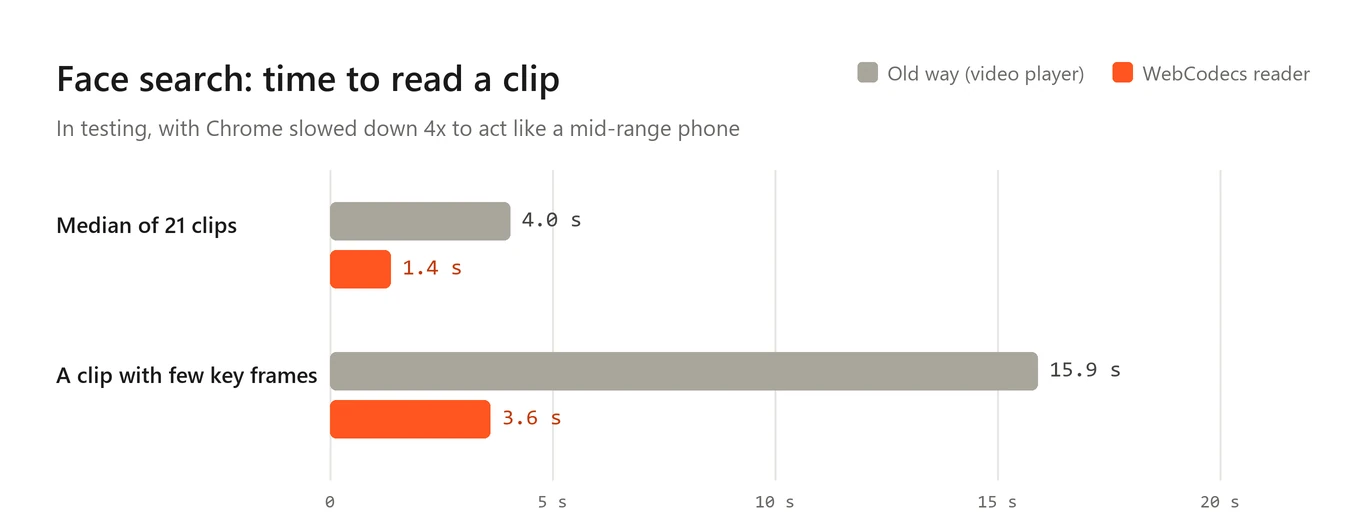
The clip with few key frames is the worst case for the old way, since every jump has to go a long way back. That's exactly where reading it in runs helps the most.
I don't have real phone numbers for face search yet, it only went live on October 11th. They'll be in the next update.
Searching while it reads
One more change, mostly for computers. The search used to wait until the whole clip was read before it sent anything. Now it sends the frames in small batches while it's still reading. By the time the last frames are picked, most of the search is already done, and if there's a Match it can show up before reading has even finished.
The final answer is exactly what you'd get by sending everything at once. In testing, the slowest 10% of clip searches on computers went from about 19 seconds to 15.
I also built a third change, sending small versions of the frames first and the full ones only when needed. It's switched off. In testing it lost a weak Similar result about once in a thousand searches, and I'd rather be a bit slower than quietly lose results.
What's left
A clip search on an Android phone still takes about 22 seconds start to finish, and reading the clip is now the smaller part of that. Next I'm looking at where the rest of the time goes.
If you tried searching a clip on your phone before and gave up waiting, give it another go.